Operation
The following aspects apply to managing Trino Gateway and the connected Trino clusters.
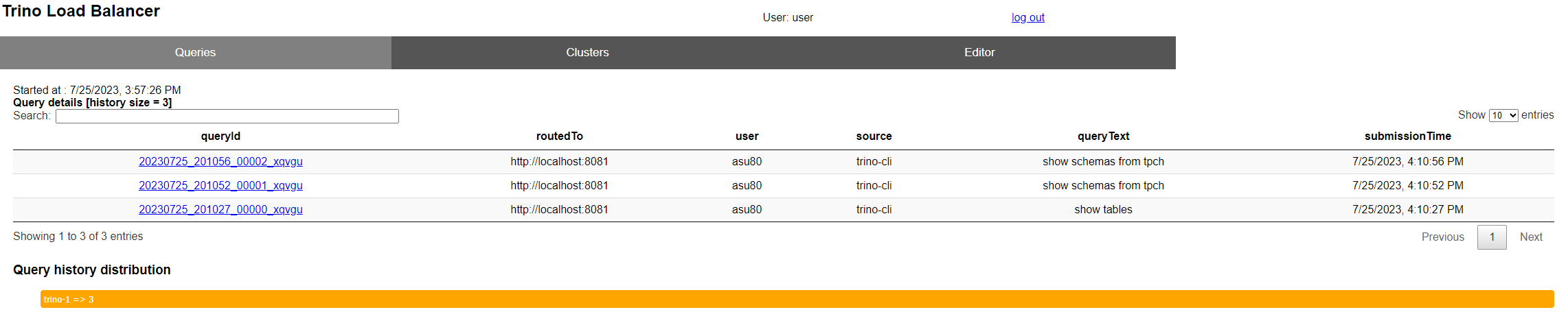
Query History UI - check query plans etc.
Trino Gateway records history of recent queries and displays links to check query
details page in respective trino cluster.
Cluster UI - add and modify cluster information
The cluster page is used to configure Trino Gateway for multiple Trino clusters. Existing cluster information can also be modified using the edit button.

Cluster configuration and health status
Trino Gateway tracks cluster state at two separate layers, each serving a different purpose.
Database: source of truth for configuration
All cluster configuration is stored persistently in a database. This includes each cluster's name, routing group, proxy URL, external URL, and whether it is marked active or inactive.
Any change made through the API or the admin UI — adding, updating, activating, deactivating, or deleting a cluster — is written to the database immediately. The database represents what you have configured: the intended state of the system. It persists across restarts.
Health check cache: source of truth for routing
In addition to the database, Trino Gateway maintains an in-memory record of each cluster's current health. This cache is separate from the database and is used to make all query routing decisions.
Each cluster in the cache has one of four health statuses:
| Status | Meaning |
|---|---|
HEALTHY |
The cluster is reachable and accepting queries |
UNHEALTHY |
The cluster failed its most recent health check |
PENDING |
The cluster was recently added or changed and has not yet been health-checked |
UNKNOWN |
Health status could not be determined |
Only clusters with a HEALTHY status receive query traffic, regardless of
whether the database marks them as active. A cluster in PENDING state does not
receive traffic — it transitions to HEALTHY or UNHEALTHY once the next
background health check evaluates it.
The cache is updated by a background health check that runs at a configurable
interval (default: every 1 minute, set via monitor.taskDelay). The health
check mechanism itself is also configurable — by default it calls the /v1/info
endpoint on each cluster, but JDBC, JMX, and Prometheus metrics are also
supported.
How the two layers interact
The database and health cache serve complementary roles:
- Database — "what you configured"
- Health cache — "what is actually reachable right now"
When you make a change via the API or admin UI, both layers are updated immediately:
| Action | Database | Health cache |
|---|---|---|
| Add a cluster | Written immediately | Set to PENDING if active, UNKNOWN if inactive |
| Update a cluster | Written immediately | Reset to PENDING if active, UNKNOWN if inactive |
| Activate a cluster | Written immediately | Set to PENDING |
| Deactivate a cluster | Written immediately | Set to UNKNOWN; excluded from routing immediately |
| Delete a cluster | Removed immediately | Removed from cache and JMX; excluded from routing immediately |
Because the database and health cache are not updated atomically, a failure during the in-memory update could leave the two layers out of sync. To prevent this, each operation uses a compensation pattern: before applying any change, the current state is saved (previous health status and backend configuration). If the in-memory update fails after the database write succeeds, the database change is reverted using the saved state:
| Action | Compensation on failure |
|---|---|
| Add a cluster | Delete the new entry from DB, remove health |
| Update a cluster | Restore old config in DB, revert health |
| Activate a cluster | Deactivate in DB, revert health |
| Deactivate a cluster | Re-activate in DB, revert health |
| Delete a cluster | Re-add old config to DB, revert health |
For update and delete, compensation is skipped if the old backend configuration was not found before the operation, to avoid reverting to an unknown state. If the compensation itself fails, the compensation exception is attached to the original exception as a suppressed exception — the original is always the one thrown to the caller.
A cluster that crashes or becomes unreachable after the last health check will
remain active in the database but will be marked UNHEALTHY in the cache
within one polling interval. During that window, in-flight queries already
routed to that cluster may fail, but no new queries will be sent to it once the
cache is updated.
The health cache is not persisted — it is rebuilt from the database and repopulated by health checks each time Trino Gateway starts.
Graceful shutdown
Trino Gateway supports graceful shutdown of Trino clusters. Even when a cluster is deactivated, any submitted query states can still be retrieved based on the Query ID.
To graceful shutdown a trino cluster without query losses, the steps are:
- Deactivate the cluster by turning off the 'Active' switch. This ensures that no new incoming queries are routed to the cluster.
- Poll the Trino cluster coordinator URL until the queued query count and the running query count are both zero.
- Terminate the Trino coordinator and worker Java processes.
To gracefully shutdown a single worker process, refer to the Trino documentation for more details.
Query routing options
- The default router selects the cluster randomly to route the queries.
- If you want to route the queries to the least loaded cluster for a user
so the cluster with the fewest running or queued queries,
use
QueryCountBasedRouter. You can enable it by adding the module name to themodulessection of the config file:
taskDelay under
monitor section in the config file. The default interval is 1 minute
Monitoring 
Trino Gateway provides a metrics endpoint that uses the OpenMetrics format at
/metrics. Use it to monitor Trino Gateway instances with Prometheus and
other compatible systems with the following Prometheus configuration:
Trino Gateway health endpoints
Trino Gateway provides two API endpoints to indicate the current status of the server:
/trino-gateway/livezalways returns status code 200, indicating the server is alive. However, it might not respond if the Trino Gateway is too busy, stuck, or taking a long time for garbage collection./trino-gateway/readyzreturns status code 200, indicating the server has completed initialization and is ready to serve requests. This means the initial connection to the database and the first round of health check on Trino clusters are completed. Otherwise, status code 503 is returned.
Database cache configuration
Trino Gateway can cache database queries to improve performance and reduce load
on the backend database. This also allow gateway to continue routing queries
when the database is temporarily unavailable. Currently only the list of backend
Trino clusters used for query routing are being cached.
The cache can be configured using the databaseCache section in the config file.
Configuration options:
enabled- Enable or disable the database cache. Default isfalse.expireAfterWrite- The maximum time a cached entry is kept since it was last loaded or refreshed. This ensures stale data is eventually removed. If cache is not refreshed before expiration, requests will fail once the entry expires (i.e. cache miss will attempt to reload data, but if the database is unavailable, the request fails because there is no stale value to fall back to after expiration). Default value is1h.refreshAfterWrite- Duration after which cache entries are eligible for asynchronous refresh. When a refresh is triggered, the existing cached value continues to be served while the refresh happens in the background. This helps keep data fresh while serving slightly stale data to avoid blocking requests. Default value is5s.
expireAfterWrite and refreshAfterWrite can be set to null to disable expiration
or refresh respectively.